Adding files
Flows
Have a folder fill in a field on every file uploaded into it.
Archivist Admin
Checked in Starchive on October 12, 2026
Every file that lands in your intake folder should start out marked “not cleared for publication” until someone has checked it. A flow does that for you.
Steps
- Open the folder. Here it is Papers › Incoming.
- Click + beside Upload and choose Create Flow. A bar names the folder you are in, Create flow for Incoming; click Confirm.

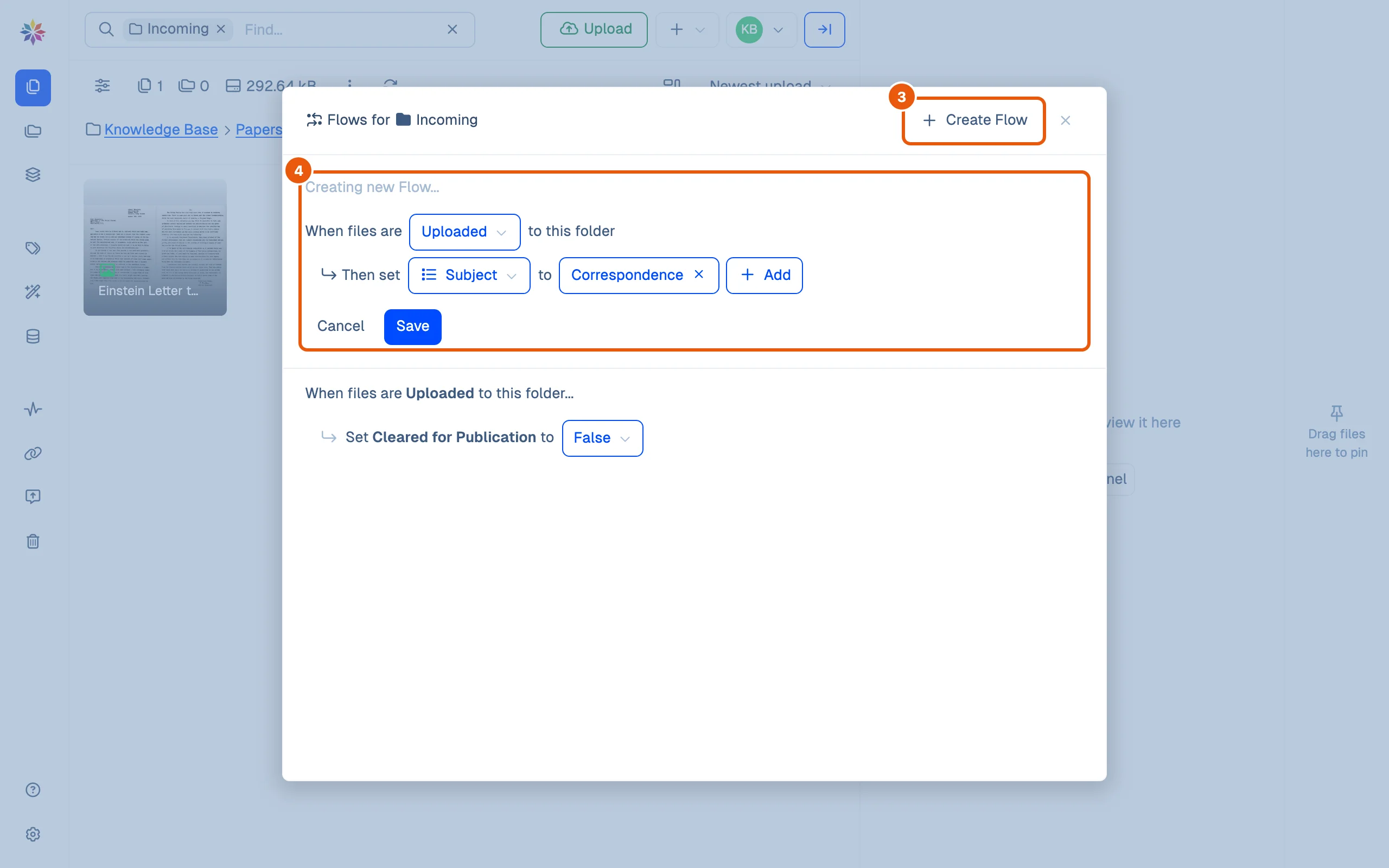
- Flows for Incoming opens, listing the folder’s flows. Click Create Flow.
- Build the rule: When files are Uploaded to this folder, Then set a field to a value. Pick the field from Select Field…, then the value: Select… for a yes/no field, Add for a list field’s terms. Click Save.
- Upload a file into the folder. When it has arrived, its details already show the value. The letter in Incoming reads Cleared for Publication: False without anyone setting it (What happens after you upload).
Good to know
- Uploaded is the only trigger the dialog offers: a flow acts on files as they are uploaded into its folder.
- A flow sets one field. A folder can have several flows, listed together in its Flows for dialog.
- The list shows each saved flow’s value as a menu (False ▾).
- The value is a starting point. Anyone allowed to edit the file can change it afterwards.
- This page was walked as the workspace owner.
Ideas for flows
| Folder | Flow | Why |
|---|---|---|
| Intake, scans waiting for review | Cleared for Publication → False | Nothing is published by accident |
| A donor’s deposit | A list field “Source” → the donor’s term | Every file says where it came from |
| Oral history recordings | Subject → Speech | One less field to fill per recording |
Questions
Can a flow add tags?
Not from the Create Flow dialog. It sets custom fields; to tag on arrival, use a list field instead of a tag.
Can one flow set several fields?
One field per flow. Make a second flow on the same folder for the next field; a list field can get several terms in one flow.
Is a flow a metadata template?
It is the closest thing Starchive has. Starchive has no separate template; a flow on an intake folder gives every new file the same starting values.