Adding files
Avoid duplicates
Keep the same file from going in twice, and where to turn when it already has.
Archivist Admin
Checked in Starchive on October 12, 2026
The same scan uploaded twice is two files: two sets of tags to keep in step, and two results for every search. The app does not stop it, so stop it at the door.
Steps
- Before you upload, search for the file’s name. Part of the name is enough; see Search.
- Upload into one agreed intake folder, so new arrivals are in one place to check.
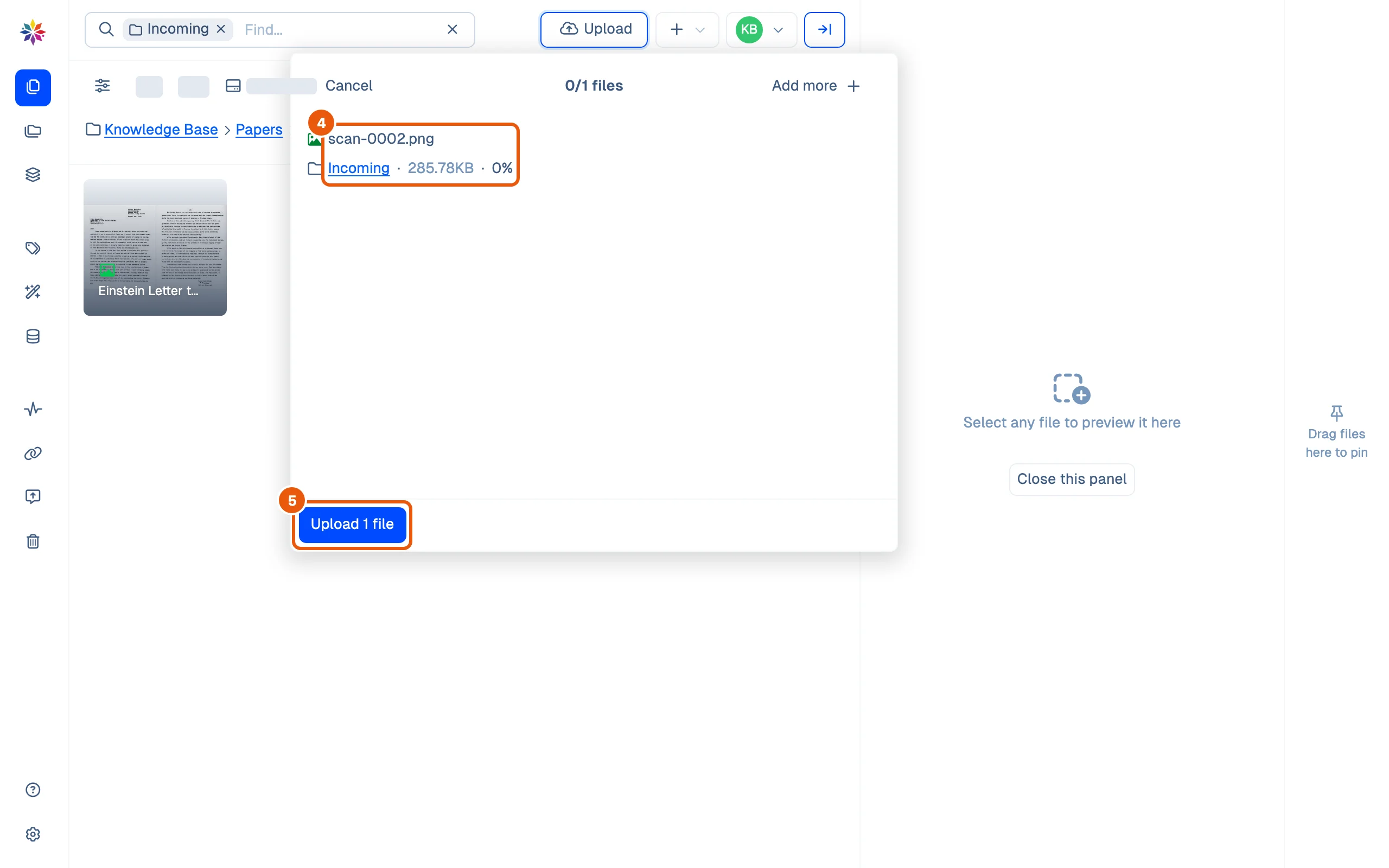
- Read the list before you click Upload. It shows each file’s name and the folder it is going to; remove anything that is already there with Cancel and pick again.
Good to know
- Starchive does not compare files on upload: a file with the same name in the same folder is not flagged.
- Give files distinctive names before you upload. scan-0001.png from two scanning sessions looks the same; 1939-08-02 Einstein Letter to Roosevelt.png does not. See Name your files.
- Finding and handling duplicates already in a workspace is the job of Star-Tools, Starchive’s companion app.
Questions
Does Starchive warn me about a duplicate?
No. Picking a file with the same name as one already in the folder gives no warning in the upload list; it would be uploaded as a second file.
How do I find the duplicates already in my workspace?
Starchive's companion app, Star-Tools, finds and handles duplicates. This guide does not cover it; ask your Starchive contact about access.